Published
- 4 min read
Migrating from AWS RDS to Neon (Postgres) for a Payload CMS app
Moved a small Payload CMS Postgres database from AWS RDS to Neon to eliminate a recurring ~$20/month bill, with ~5 minutes of downtime.
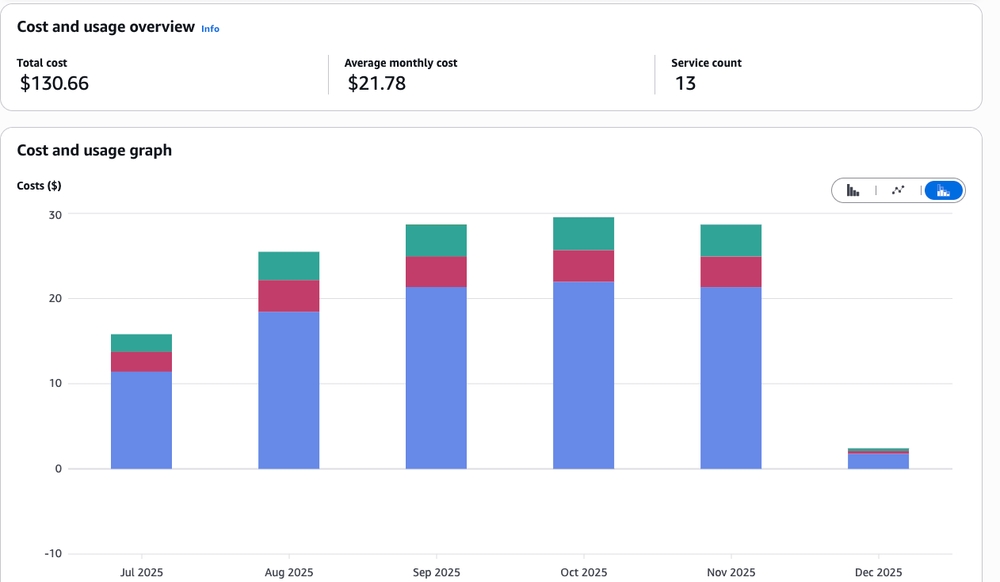
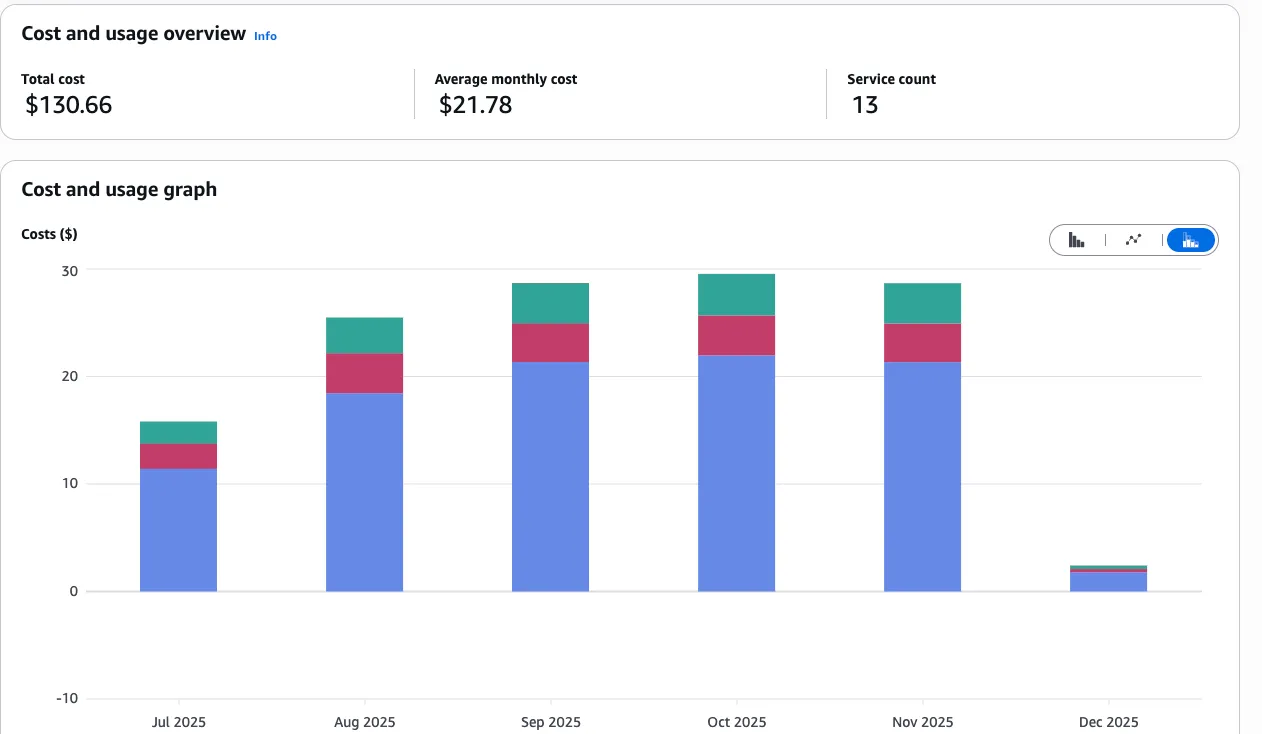
This project had a working Postgres database on AWS RDS, but the recurring cost (~$20/month) was high for its usage level.
TL;DR
- Migrated a Payload CMS Postgres DB from AWS RDS → Neon.
- Cut hosting cost from ~
$20/monthto~$0(Neon free tier) for current usage. - Used
pg_dump/pg_restorewith--no-owner --no-privilegesto avoid role/permission mismatches. - End-to-end took ~30 minutes, with ~5 minutes of downtime while swapping
DATABASE_URIand restarting.
At a glance
- Role: solo.
- Stack: Payload CMS + Node, Postgres, AWS RDS → Neon.
- Scale: small app, small DB (restore finished fast).
- Timeline: ~30 min end-to-end.
Why I moved
The project was paying ~$20/month for AWS RDS to host a relatively small Payload CMS database. It worked, but the cost was not proportional to the workload.
Neon’s free tier covers current usage. It also felt faster for this workload, but there are no pre-migration baseline metrics.
Constraints I cared about:
- Keep it boring. No re-platforming, no schema changes, just “same Postgres elsewhere”.
- Low downtime was fine, but zero-downtime was not required.
- Don’t fight permissions. Managed Postgres products all have slightly different roles/privileges.
The Migration (what I actually ran)
Step 1: Dump from AWS RDS
The entire DB was dumped from RDS. The key flags were --no-owner and --no-privileges because provider defaults (roles/users/grants) do not match 1:1.
pg_dump \
  -h <your-rds-endpoint>.rds.amazonaws.com \
  -U <your_user> \
  -d <your_db_name> \
  --no-owner \
  --no-privileges \
  -F c \
  -f database_dump.dump
Two quick notes:
- The dump file saves to your local machine, not inside RDS.
-F cis Postgres’s custom format (compressed, and it can be restored in parallel).
Step 2: Upgrade pg_dump (if needed)
If local pg_dump is outdated, upgrade it. Example using Homebrew on macOS:
brew update
brew install postgresql@16
export PATH="/opt/homebrew/opt/postgresql@16/bin:$PATH"
In general: a newer pg_dump can dump from an older Postgres server, but not the other way around.
Step 3: Restore to Neon
My first attempt used a full connection string directly:
pg_restore -v \
  -d postgresql://<neon_user>:<neon_password>@<neon-host>/<neon_db>?sslmode=require \
  database_dump.dump
And I got:
zsh: no matches found: postgresql://neondb_owner:<pass>@...?sslmode=requirezsh treats ? as a wildcard, so it tries to glob the connection string. Fix: quote the URI, or use individual flags.
This restore used flags (with role/privilege suppression):
pg_restore -v -j 4 \
  --no-owner \
  --no-privileges \
  -h <neon-host> \
  -U <neon_user> \
  -d <neon_db> \
  database_dump.dump
For larger restores, use Neon’s direct connection (not the pooler) for import, then switch the app to the pooler connection string.
Step 4: Update environment variables
Then the app’s DATABASE_URI/DATABASE_URL was swapped to the Neon connection string:
- DATABASE_URI=postgresql://user:pass@rds-endpoint.amazonaws.com/db
+ DATABASE_URI=postgresql://<neon_user>:<neon_password>@<neon-host>/<neon_db>?sslmode=require
Payload picked it up on restart. No schema changes or migrations were required.
Step 5: Quick smoke test (before cleanup)
- Open the admin panel and confirm you can log in.
- Create a record, edit a record, delete a record.
- Run one “real” query path in the app (whatever hits your most-used collections).
- Check logs for connection churn/timeouts (pooler vs direct string matters here).
What I Learned
1. Role mismatches are real. Different providers ship different default roles/grants. --no-owner --no-privileges saved me from a bunch of noisy restore errors.
2. Check extensions. If you rely on extensions (ex: uuid-ossp, pg_trgm, PostGIS), confirm they exist on the target before you commit.
3. Quote connection strings in zsh. If your command has ? (like sslmode=require), zsh will happily interpret it as a glob.
4. Measure before migrating. Baseline latency/throughput metrics should be captured before moving providers.
The tradeoff (what you give up for “free”)
Tradeoffs:
- Neon’s serverless model can behave differently than a constantly-on RDS instance (connection pooling is more important, and long-lived connections can be a footgun).
- Vendor UI/DX is nicer, but production data is still moving to another managed provider.
Results
- Cost: ~$20/month → ~$0 for this usage profile (≈ $240/year saved).
- Downtime: ~5 minutes.
- Effort: ~30 minutes end-to-end.
- Data integrity: no data loss, no compatibility issues (for this schema/extension set).
Links
- Neon: https://neon.tech
pg_dump: https://www.postgresql.org/docs/current/app-pgdump.htmlpg_restore: https://www.postgresql.org/docs/current/app-pgrestore.html
If you are running a side project on RDS and the cost is disproportionate, this is a practical migration to evaluate.